Get started with Spelmaskinen
Spelmaskinen is a program that runs on your own computer. It fetches the bookmakers' odds, calculates what the odds should be, and lists the rows where the bookmaker has priced the outcome higher than that level. The program doesn't place any bets for you — it points, you decide.
This guide takes you all the way: from the license key in the email to a placed bet with the bookmaker. Seven steps, about ten minutes.
Download the program
Right after purchase, you'll get a license key on screen and the same key by email. The key is both your download ticket and your login for the program — save it.
- Open the download page.
- Paste the license key into the field and click Verify key.
- Click Download SpelmaskinenPRO_Setup.exe once the download is unlocked.
The file is 12.8 MB. Everything you need is in it — you don't need to install Python or anything else first.
SpelmaskinenPRO_Setup.exe is in your downloads folder.
Install
Double-click the file you downloaded. The installation wizard is in Swedish and takes under a minute.
- Click Next on the welcome screen.
- Read through the license agreement and click I accept.
- Keep the suggested folder and click Install.
- Click Finish. The program starts and a shortcut is placed on the desktop.
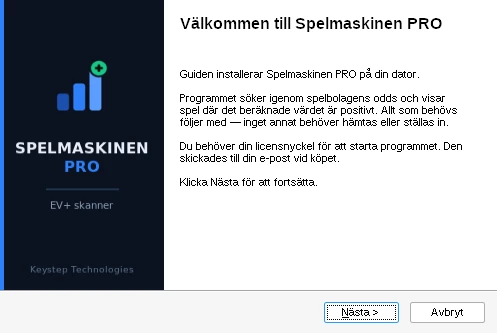
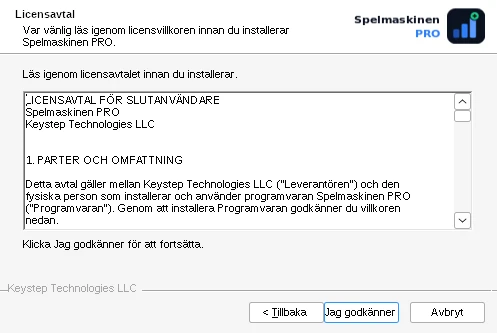
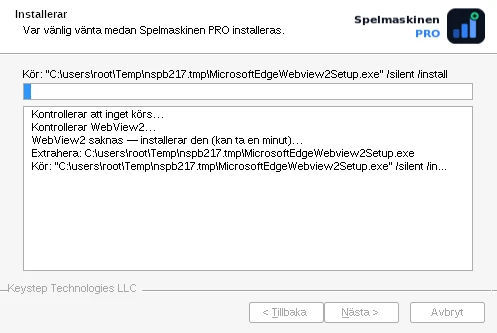
The program is installed for your user, not for the whole computer. You therefore don't need administrator rights.
Activate the license
The first time the program starts, you're met by the activation box. Here you paste in the same key you used to download.
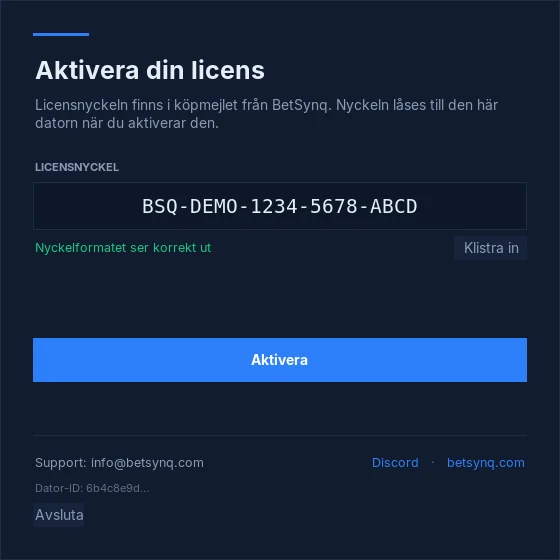
- Paste the key into the field LICENSNYCKEL. It has the form
BSQ-XXXX-XXXX-XXXX-XXXX. The button Klistra in on the right, it retrieves it directly from the clipboard. - Wait until it says The key format looks correct below the field.
- Click Activate.
The license is locked to one computer through a fingerprint of the hardware. It follows the computer, not the location — you can use the program at home, at work or while travelling.
If you're switching computers, click Log out, the red button at the bottom right of the control panel. This releases the licence from the computer, and the key can be activated on the next one. At the bottom of the activation window is also Dator-ID — that code is good to include if you need to contact support.
Set up the scan
Click Settings in the button row at the bottom of the window before starting the first scan. The window has three fields — no more. The filters for edge and odds are built into the engine and are not something you need to configure.
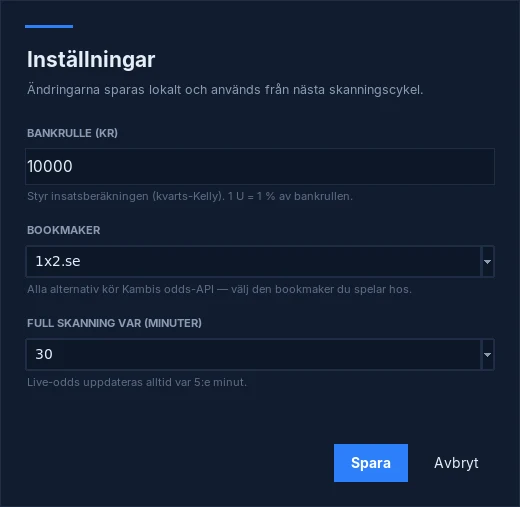
- Bankrulle (kr)Your betting bankroll. It controls the stake calculation, which uses quarter-Kelly. In the program, it is 1 U = 1% of the bankroll — with SEK 10,000 in the bankroll, 1 U is therefore SEK 100. Enter what you have actually set aside, not what you could afford to bet. The minimum value is SEK 500.
- BookmakerWhich bookmaker the odds are retrieved from and the rows point to. The options are 1x2.se, Unibet, Paf, ATG Sport, Golden Bull and X3000 — all with a Swedish gambling licence. Choose the company where you actually have an account, otherwise the rows point to odds you cannot bet on.
- Full skanning var (minuter)How often the full range is recalculated. The options are 10, 15, 20, 30, 45 and 60 minutes; 30 is the default and is sufficient for matches starting later today. Ongoing matches are always updated every five minutes, whatever you choose here.
Click Save. The confirmation appears in Logg, with bankroll, bookmaker and interval displayed so that you can see the correct values were used.
Start the scan and read a row
Click Start scan, the blue button at the bottom left. The program retrieves odds, recalculates each market and lists the discrepancies. One round is called a cycle, and the text beside the buttons shows which cycle ran, when, and how many EV+ and live rows it produced.
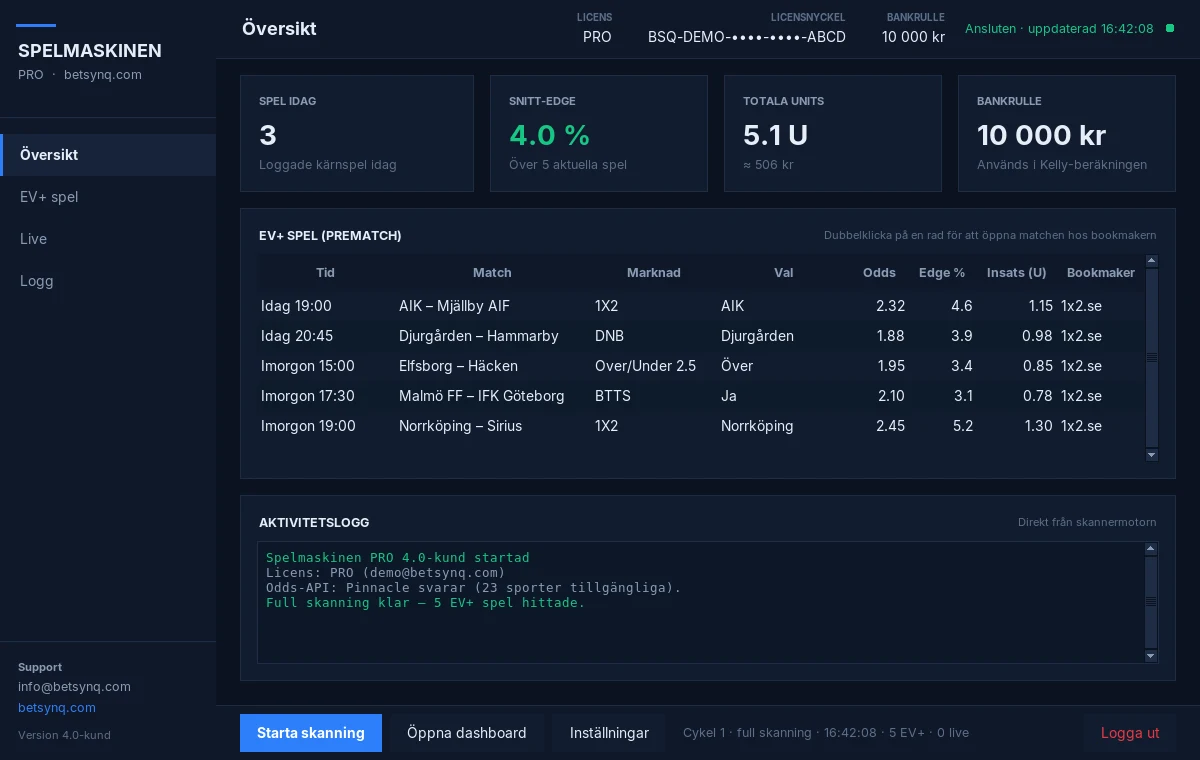
The key figures are worth explaining. Average edge is the average across the rows currently displayed, not a result. Total units is the sum of the suggested stakes, in other words what it would cost to bet on the whole list — not what you have won. The monetary amount below is the same total calculated using your bankroll.
Under EV+ bets in the left-hand menu is the full list. Click a column heading to sort, and double-click a row to open the match at the bookmaker. This is how to read a row.
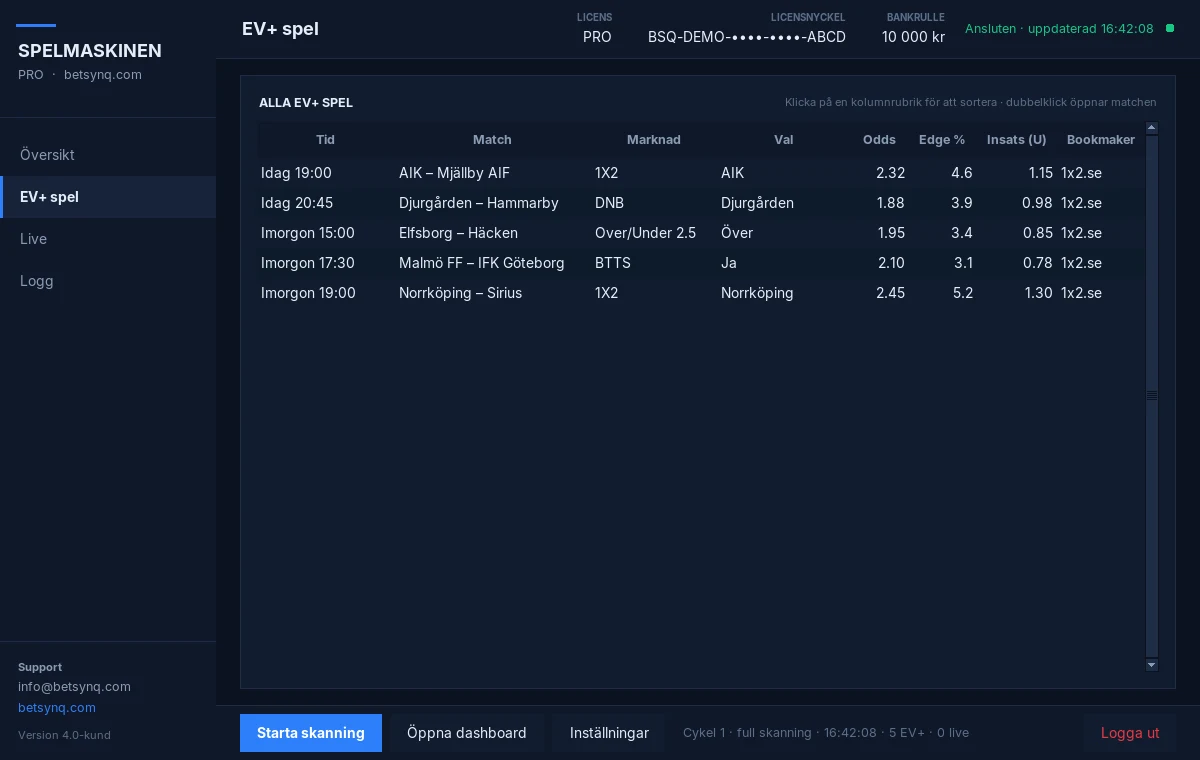
- TimeWhen the match starts. If it's already underway, the row is found under Live instead, and the column is then called Klocka and shows the match clock.
- MatchThe teams or the players. This is the text you'll search for at the bookmaker in the next step.
- MarknadWhat you are betting on.
1X2means home, draw or away.DNBmeans the stake is returned on a draw,Over/Under 2.5applies to the number of goals,BTTSthat both teams are to score. The full list is in the glossary. - ValWhich side of the market the row applies to. If it says
1X2in Marknad andAIKin Val, it means a home win for AIK. It is this combination that must match at the bookmaker — the right match with the wrong side is a different bet. - OddsThe bookmaker's odds when the row was found. This number moves. In the next step, you compare against what's currently listed at the bookmaker.
- Edge %How much higher the bookmaker's odds are than the fair odds, in percent. A positive edge is an estimate — not a promise. How it's calculated is described in Methodology.
- Insats (U)The program’s suggestion in units, not kronor. 1 U corresponds to 1% of your bankroll. The suggestion is quarter-Kelly, meaning one quarter of what the Kelly formula would say. See the note below before following it directly.
- BookmakerWhere the odds are available — the company you selected in the settings. Always a company with a Swedish gambling licence.
BetSynq’s own EV+ service increased the stake in the same way until 12 September 2026, when a review of our own history showed that the increasing stake cost money compared with staking the same amount each time. We switched to a fixed stake. That measurement applied to our selection and our markets, not Spelmaskinen’s models — but the principle is worth knowing, and the figures are openly available on Results. The same stake every time is the more cautious approach until you have enough of your own track record to say otherwise.
Find the bet at the bookmaker
Now you're leaving the program. Spelmaskinen isn't connected to any betting account and doesn't place any bets — you go yourself to the bookmaker listed in the column Bookmaker.
- Open the bookmaker's site and log in.
- Choose a sport in the left menu, then the league. The example below is Football → Sweden → Allsvenskan.
- Find the match with the same start time as in the program.
- Compare the odds for the correct market and the correct side.
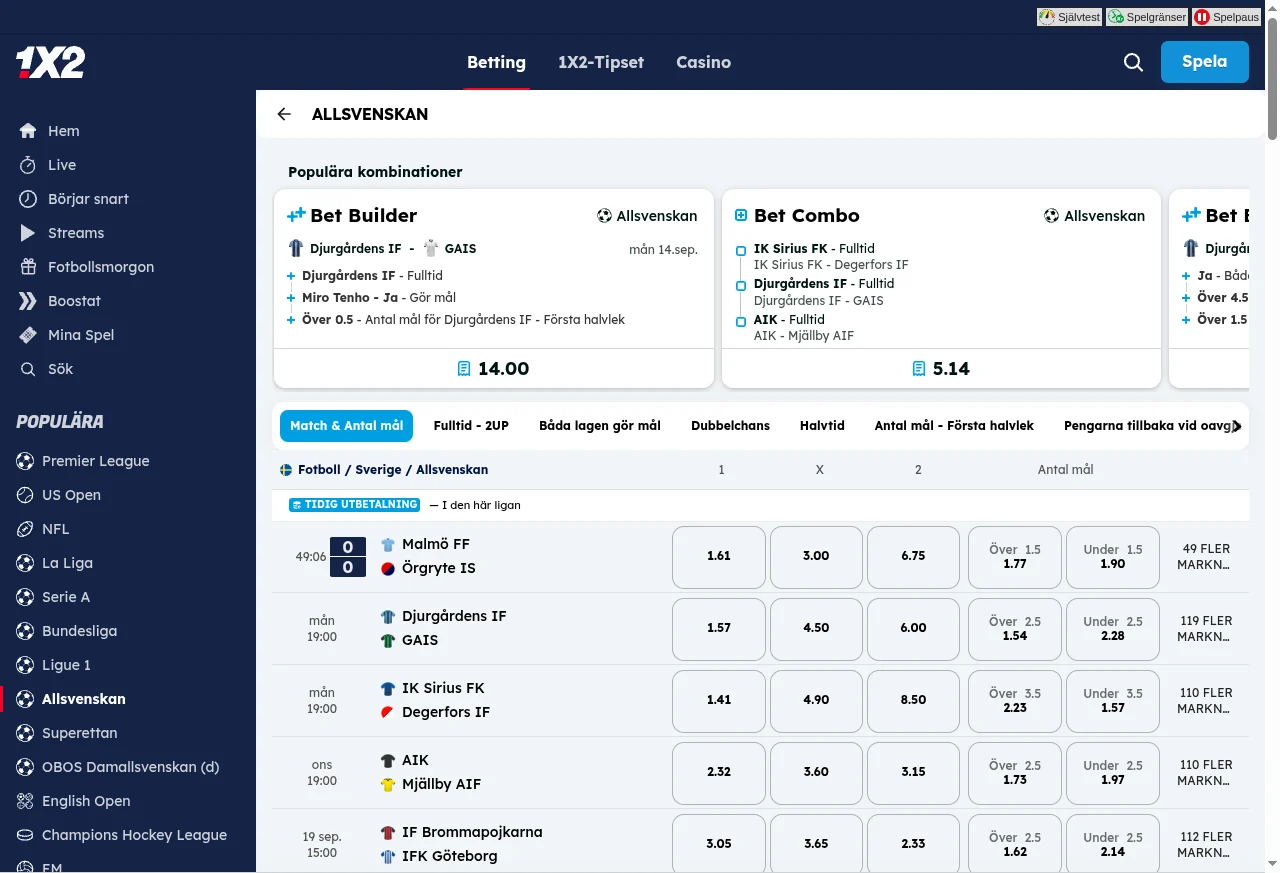
If the row concerns a market that isn't visible at the first level — corners, goalscorers, handicap — you click on more markets to the right of the match. That's where the rest are, often over a hundred per match.
Place the bet and follow up
Place the bet with the bookmaker as usual. Then begins the part that determines whether this works for you: the follow-up.
- Note the bet down immediately — match, market, the odds you actually got, stake and date. Bet Tracker does it for you if you're logged in.
- Note the odds you actually got, not the odds the program showed. The difference between them is worth tracking in itself.
- Keep the same stake in kronor on every bet for the first hundred bets.
A single bet says nothing about a model. A won bet at odds of 2.32 could just as easily be luck as skill, and twenty bets aren't enough either. It's only after a few hundred settled bets that the number starts to mean something — and even then with an uncertainty margin larger than most people think.
How BetSynq calculates edge, fair odds, units and settlement is described in Methodology & Transparency. BetSynq's entire own track record, wins as well as losses, is openly available at Results.
Glossary
The terms you encounter in the program, explained once. If you want to see how they're calculated, the formulas are in Methodology & Transparency.
- Edge
- How much higher the bookmaker's odds are than the fair odds, expressed in percent.
Edge% = (fair probability × offered odds − 1) × 100 - Fair odds
- The odds that correspond to the calculated probability, without the bookmaker's margin. Also called fair odds.
- Implied probability
- The probability that an odds corresponds to:
1 / odds. Odds of 2.00 correspond to 50%. - Margin (vig)
- The bookmaker's margin. If you sum the implied probabilities for all outcomes in a market, the total is always more than 100% — the excess is the margin.
- Unit (U)
- A staking unit. Calculating in units makes results comparable regardless of the size of the bankroll used. Note that the unit is defined differently in two places: in Spelmaskinen, 1 U = 1% of your bankroll, whereas 1 U on BetSynq’s results pages is always SEK 100. With a bankroll of SEK 10,000, they are the same thing.
- Cycle
- A full scan of the markets. The text in the button row at the bottom of the program shows when the latest one ran and what it produced.
- DNB
- Draw No Bet. The stake is refunded if the match ends in a draw.
- BTTS
- Both Teams To Score — both teams score. Yes or No.
- AH
- Asian handicap. One of the teams gets a head start or deficit in goals, which removes the draw as an outcome.
- Over / Under
- A bet on whether a number of goals, points or games will be more or fewer than a given line.
- Void / cancelled
- The bet counts as neither a win nor a loss. The stake is returned. Happens with a cancelled match or an invalid market.
- CLV
- Closing Line Value. Your odds compared to the market's final odds before kickoff. Positive CLV over time is the strongest indication of a genuine edge.
Common problems
The license key isn't accepted
Check that the entire key came through — it's 16 characters after the prefix BSQ-. If you copy from the email, a trailing space sometimes comes along at the end.
If the key is already activated on another computer, you must first log out there. If you cannot access it, write to info@betsynq.com with your Dator-ID and we will sort it out.
Windows refuses to open the file
Click More info in the blue box and then Run anyway. The warning is because the program isn't code-signed yet.
If your antivirus blocks the file completely, you'll need to allow it manually. Always download from the download page — never from a link that's been forwarded to you.
The scan finds no bets
That's normal at certain times. If no matches are close to kickoff, there are no markets to compare either.
If you get zero rows for several cycles in a row during an evening of matches: check in Logg that the scan is actually running and the odds API is responding. Also try another Bookmaker in the settings — the range differs between companies, and not all offer every sport.
The edge and odds limits are built into the engine and cannot be changed in the program. This is deliberate: a lower threshold gives more rows, but not more good rows.
The odds at the bookmaker are lower than in the program
Then the market has moved since the line was found. The calculation was based on the higher odds, so the edge is fully or partially gone.
Skip the row. Chasing a bet that has already been repriced is the fastest way to eat up an edge that was small to begin with.
I'm switching computers
Click Log out, the red button at the bottom right, before you leave the old computer. The licence is then released from it. Install it on the new one and activate it with the same key.
If the old computer is already gone, support can help you release the license.
Can the program place the bets for me?
No. Spelmaskinen has no connection to any betting account and doesn't handle any stakes. It fetches odds, calculates and displays them — then every bet is your own decision.
Is profit guaranteed?
No. Spelmaskinen is an analysis tool. A positive edge is an estimate of a mathematical advantage over time — not a prediction about a single bet, and not a promise of returns. Historical results are no guarantee of future outcomes.
Something stuck?
Write to support and we will reply in Swedish. Please include your Dator-ID and a screenshot — it usually halves the number of back-and-forth messages.